

ClearSync vs HubSpot's Stripe App
HubSpot offers a free Stripe data sync app. So why do SaaS teams switch to ClearSync? Here's what's different between the two. (Hint: ClearSync is purpose-built for SaaS teams!)
FEATURE COMPARISON
Side-by-Side Breakdown
What you get with each option
THE GAP
Where HubSpot's Stripe App Falls Short
HubSpot's free Stripe App is a fine starting point for basic invoice syncing. But if you need real revenue intelligence with subscription and payment data, the app requires HubSpot Enterprise and the data you get has critical gaps.
No MRR calculation
The native sync doesn't calculate MRR. Payment amounts show prorated charges, not actual revenue changes, and one-time and recurring charges get commingled into one view.
Revenue stuck at contact level
Stripe customers only sync to HubSpot contacts, never companies, so revenue data stays stuck at the contact level. You can't see total account value on the company without manual work.
No historical backfill
The native sync only moves data forward from when you connect. Your entire Stripe history stays invisible in HubSpot.
HubSpot Enterprise required for key objects
Syncing Stripe subscription & payment data require HubSpot custom objects, only available in Enterprise. Many custom fields also need the Data Hub Starter add-on. The "free" sync has hidden costs.
No subscription lifecycle tracking
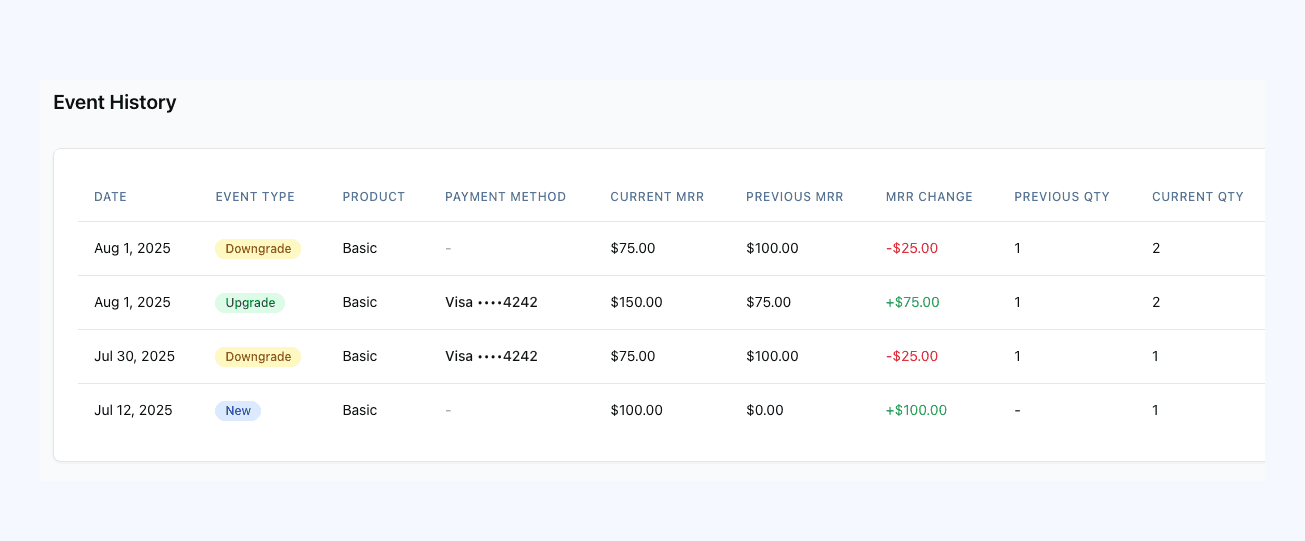
You can't distinguish between an upgrade, downgrade, cancellation, or trial conversion. All subscription changes look the same.
Orphaned, disconnected data
Payments have no Stripe subscription ID, so you can't link them to subscriptions. Invoices can't associate to custom objects. Coupon and discount fields exist but don't populate.
Want to know more about how HubSpot's Stripe App works? Check out our detailed blog post and video:
CLEARSYNC'S ADVANTAGE
Where ClearSync Pulls Ahead
A closer look at the areas where the difference matters most
Q&A
Frequently Asked Questions
How does ClearSync work?
ClearSync transforms and pushes your Stripe MRR data to HubSpot CRM, keeping all your data up to date in real time. It uses read-only access to your Stripe account and pushes MRR change events to your HubSpot CRM for founders and GTM teams to use in HubSpot reports and automations.
Who is ClearSync for?
ClearSync is built for SaaS companies that use Stripe for subscriptions and HubSpot for CRM. We've thought about the best way to transform and sync your MRR & revenue data to HubSpot in the most usable way for founders, finance, ops, and GTM teams.
What Stripe data does ClearSync push to HubSpot?
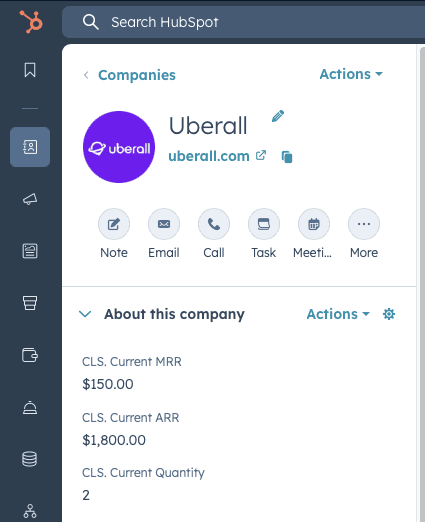
ClearSync pushes company, contact, current MRR, past MRR, MRR change, product data, current and previous quantity data, type of change (plan change, quantity change, price change), cancellation events, subscription start date, billing start and end dates, payment method, and subscription status data to HubSpot.
Does ClearSync create new companies and contacts in HubSpot for me?
Yes, if you want us to. ClearSync looks for existing companies and contacts in your HubSpot account and creates them if they don't yet exist. If they do exist, ClearSync maps all Stripe data to custom Subscription and Event app objects and associates them to your HubSpot companies and contacts.
Will ClearSync overwrite my existing HubSpot data?
No. ClearSync finds existing companies and contacts in HubSpot and enhances them with Stripe data in new fields and HubSpot app objects. If ClearSync can't find a matching company or contact, we can create one for you.
How far back can I import my Stripe history?
ClearSync imports your full Stripe history so you can see how your subscriptions and MRR have changed since you started with Stripe.
Can I see new purchases, churn, contraction, and expansion over time in HubSpot?
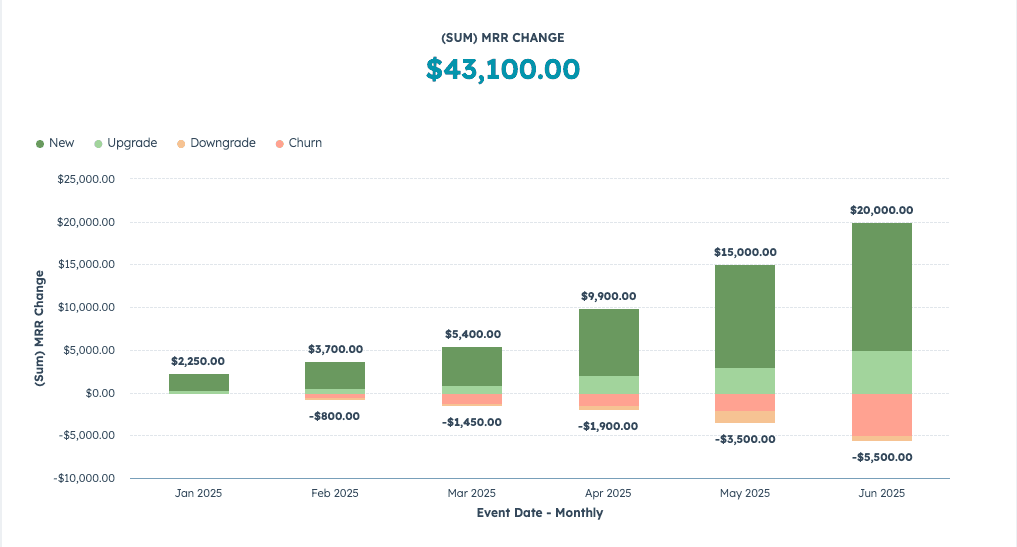
Yes. ClearSync was built with this use case in mind. Our app is built to show you new purchases, expansions, contractions, and churns as they happen.
How often does ClearSync push Stripe data to HubSpot?
When getting set up, ClearSync does a one-time import of all your historical invoices and reconstructs your MRR history based on a customer's history with your company. Once you're integrated, ClearSync pushes changes from Stripe subscriptions to your HubSpot CRM every 5 minutes.
Can I connect multiple Stripe accounts to the same HubSpot account?
Yes! You can connect multiple Stripe accounts to ClearSync and push to the same HubSpot account. Drop us a line if you have this use case and we will help you get set up.
Do you offer free implementation help?
Yes, ClearSync was built by two former HubSpotters who are experts in what we do. We're happy to help you get set up and answer any questions about reports or best practices in HubSpot or Stripe. Just schedule some time with us and we'll ensure you're set up for success.