

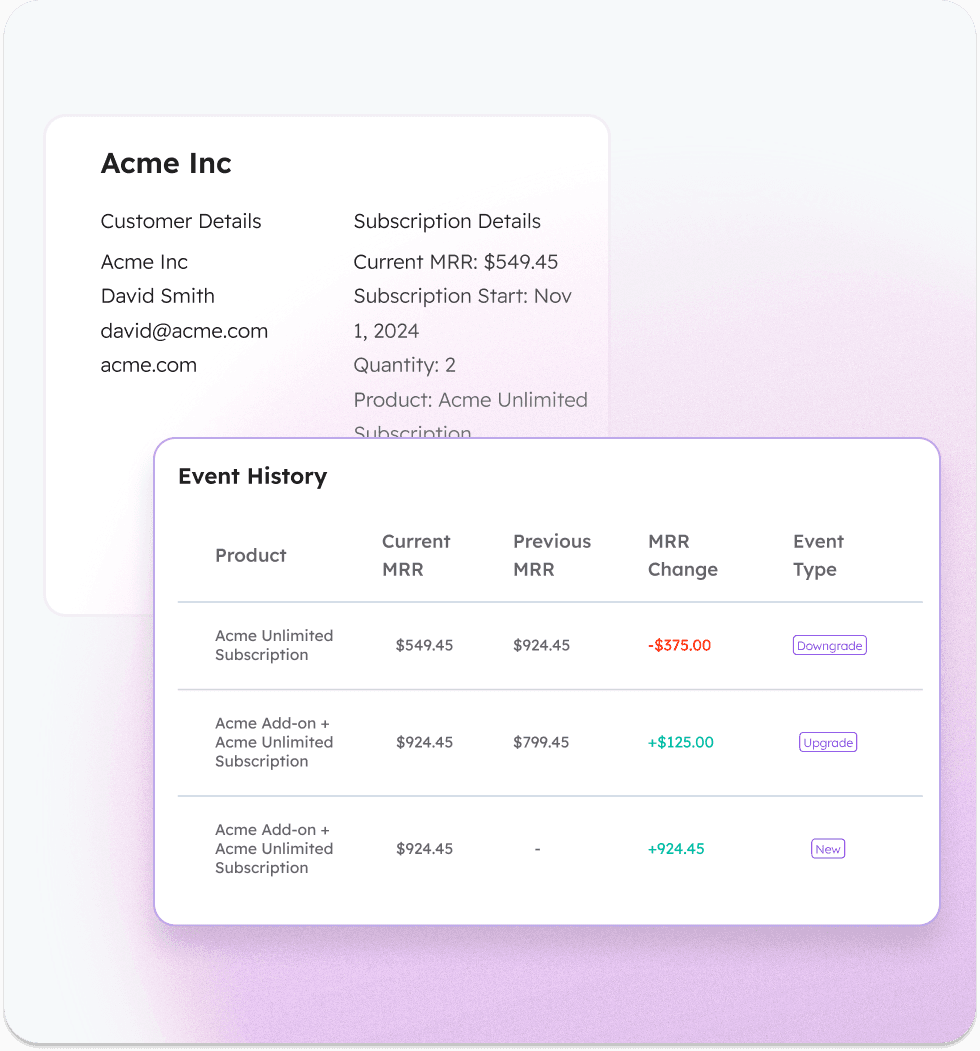
If your company runs on Stripe + HubSpot, you may already know your MRR, but when something changes, like a customer downgrades, cancels, or fails a payment, enabling your GTM team who only has access to HubSpot to answer simple questions like these become hard:
Which customers downgraded this week?
Did that churn happen because of a failed payment or a cancellation?
Which accounts upgraded after their trial ended?
Lots of teams end up digging through Stripe logs, CSV exports, or custom reports just to figure out what actually happened. This is because with most Stripe and HubSpot integrations, HubSpot usually only receives the result of subscription changes, not the history of events themselves.
In this guide we’ll walk through:
What subscription event tracking actually means
Why Stripe → HubSpot integrations struggle with this
How to track upgrades, downgrades, churn, and payment failures directly in HubSpot
How teams use those events to automate retention and expansion workflows
The Problem: HubSpot May Show MRR, But Not What Changed
Most Stripe → HubSpot integrations sync fields like:
MRR
Subscription status
Plan name
Customer ID
This lets you build dashboards showing revenue totals as of today, but it doesn’t show the story behind the numbers and when they changed. That means Customer Success can’t see downgrade signals, Finance can’t analyze churn reasons, Marketing can’t trigger recovery workflows, and RevOps can’t build clean churn reporting.
This is why teams say “We have the data in Stripe, but no one can actually use it.”
What Stripe Subscription Event Tracking Actually Means
To make Stripe revenue actionable in HubSpot, you need to track events, not just totals. This allows you to take action and alerts on events that are happening in Stripe directly in your CRM. Common subscription events include:
1. New Subscription
A customer starts their first paid subscription. This is often the first revenue event that sales and customer success want visibility into inside HubSpot.
Example: A trial user converts or a new customer purchases a plan.
HubSpot use case: Notify the account owner, create a deal automatically, and trigger onboarding workflows
2. Upgrade
Customer increases their plan, seats, or price.
Example: They upgraded from the Pro Plan → Enterprise
HubSpot use case: Trigger expansion alerts to the account owner.
3. Downgrade
Customer reduces their subscription value.
Example: The account moved from 10 seats → 5 seats
HubSpot use case: Flag accounts showing early churn signals.
4. Voluntary Churn
Customer intentionally cancels.
Example: Subscription canceled at period end.
HubSpot use case: Move customer to churn workflow and collect feedback.
5. Involuntary Churn (Payment Failure)
Customer didn’t cancel, but the payment failed.
Example: Card expired or invoice has been left unpaid for 2 weeks.
HubSpot use case: Trigger payment recovery email workflows.
6. Trial Conversion
Customer converts from trial to paid.
Example: Customer converted from free 14-day trial to a paid subscription.
HubSpot use case: Notify the account owner and move lifecycle stage to customer.
7. Planned Cancellation
Customer schedules a cancellation at the end of their billing period. This is important because it allows teams to intervene before revenue is lost.
Example: Subscription set to cancel at period end.
HubSpot use case: Trigger retention outreach and alert the account owner.
When these are all tracked as individual events, GTM teams can finally see what’s happening with revenue in real time.
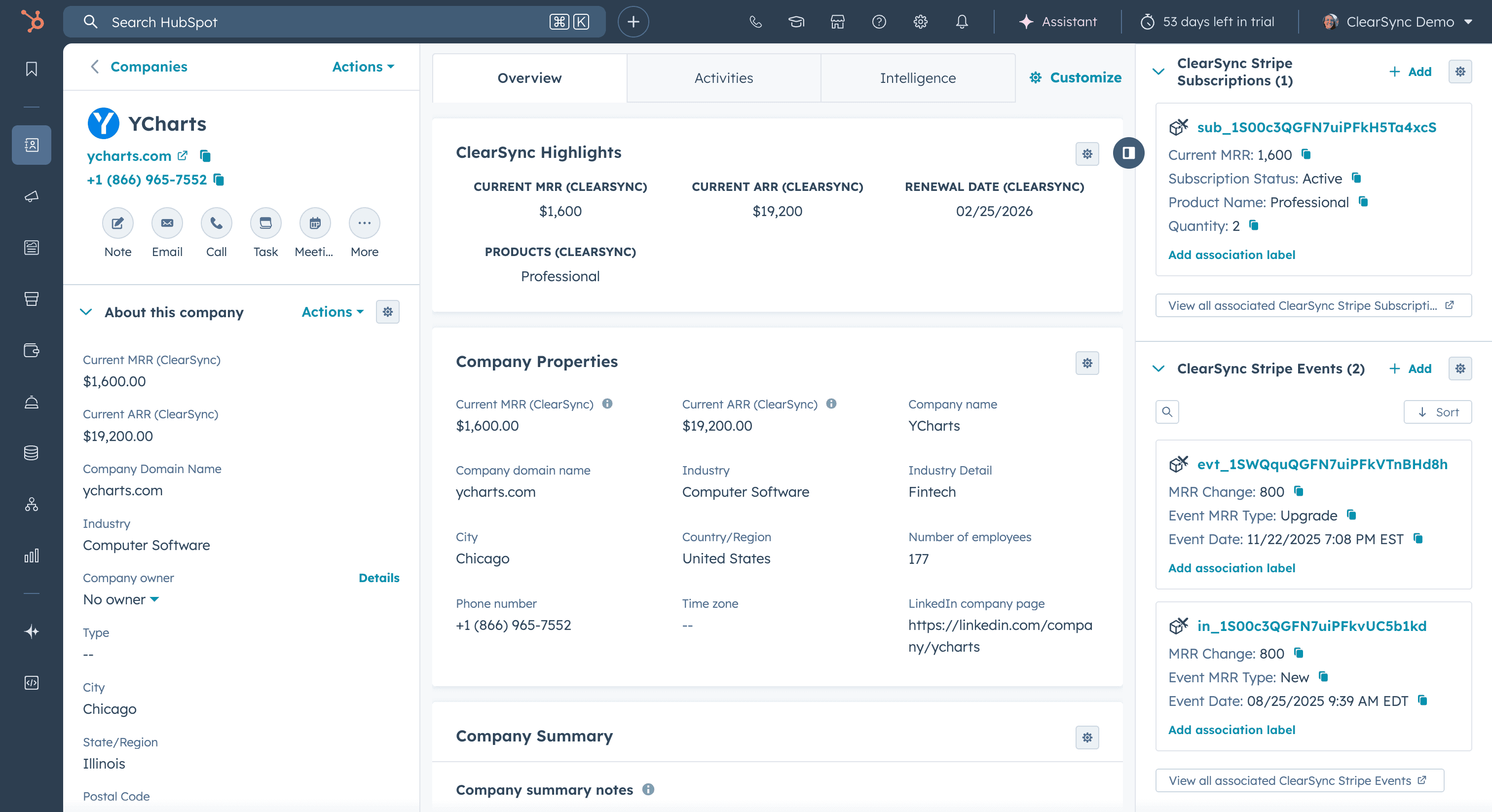
An example of Stripe event and subscription records (right sidebar) associated to the Ycharts company record in HubSpot.
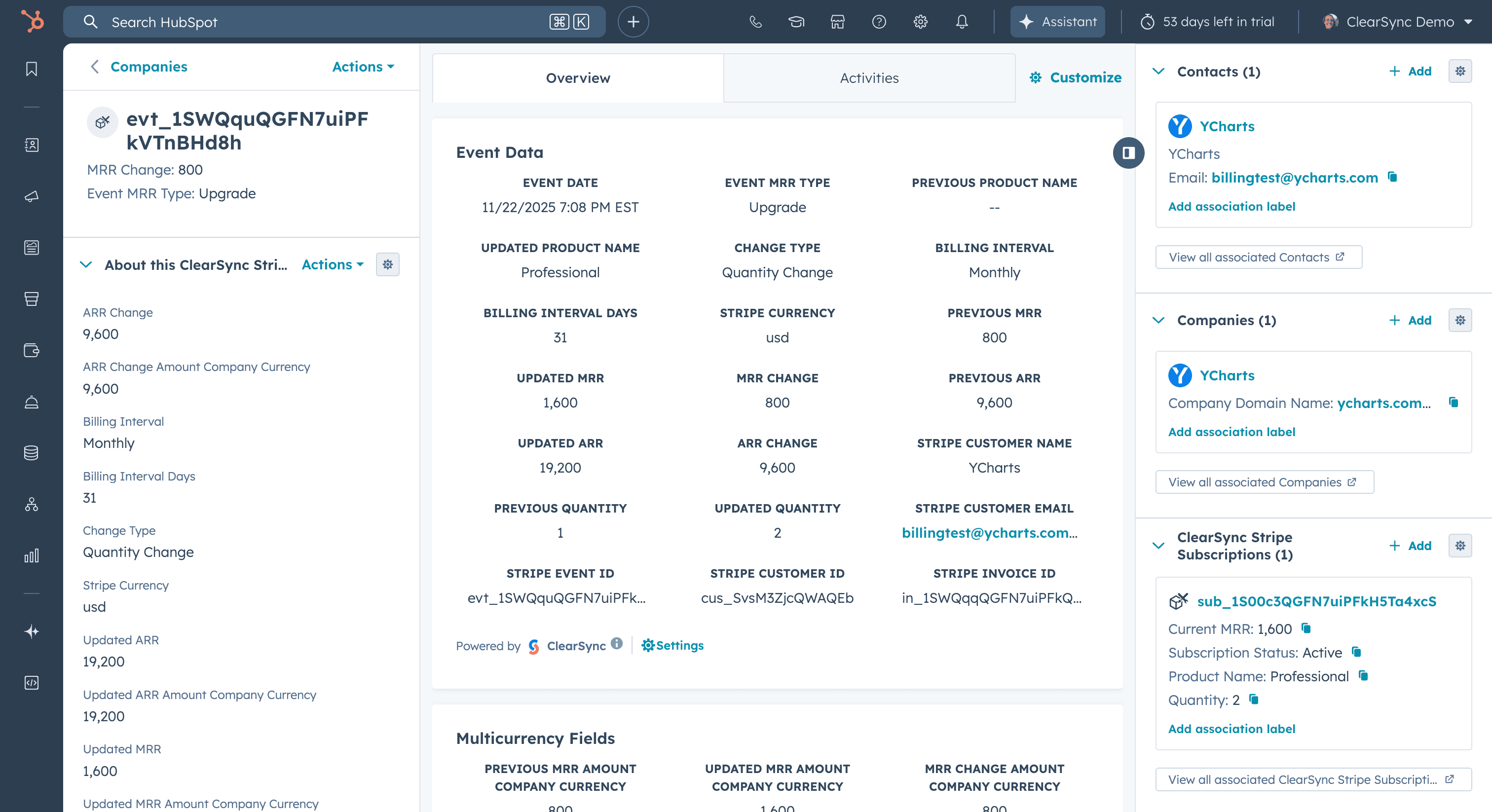
An example upgrade event record for YCharts in HubSpot. This shows the customer paid for an $800 upgrade for a new seat on 11/22/2025. This transaction happened in Stripe and was synced to HubSpot in real time via ClearSync.
What This Looks Like When It’s Done Right in HubSpot
Instead of just updating fields, subscription changes become timeline events tied to contacts and companies.
Example customer timeline:
Jan 4 – Trial Started
Jan 18 – Trial Converted (+$49 MRR)
Mar 2 – Seat Upgrade (+$120 MRR)
May 11 – Payment Failed (subscription status changed to "past due")
May 13 – Payment Recovered (+$169 MRR, subscription status changed to "active")
Oct 2 – Downgrade (-$80 MRR)
Once these events exist inside HubSpot, you can build:
Workflow automations
Trigger: Payment Failed event
Action: Send email from HubSpot + notify account owner in Slack
Churn risk lists
Example filters would be creating a list of customers where:
Downgrade event in last 30 days
Subscription status is "past due"
No upgrade event after downgrade
Expansion opportunity reports
Create a report of companies with:
2+ upgrades in last 90 days
MRR above $1k
These become sales expansion targets.
Why Most Stripe → HubSpot Integrations Can’t Do This
Most integrations sync subscription snapshots, not event history. They typically read the subscription, update HubSpot fields, and overwrite previous values. This means the system loses the context of what happened.
Some teams try workarounds like:
Using SaaS analytics tools
Tools like ChartMogul, Baremetrics, and Grid are excellent for financial analytics and dashboards, but they are designed primarily to calculate MRR and revenue metrics in their own dashboards, not to power CRM workflows.
When they sync data into HubSpot, they typically push a single MRR value or subscription status field. Each time the subscription changes, the field simply overwrites the previous value.
This works well for reporting, but it still doesn’t answer operational questions like:
Which customers downgraded this week?
Which cancellations were planned vs involuntary?
Which accounts experienced a payment failure yesterday?
Because those tools focus on metrics, not event-level CRM workflows, the context behind revenue changes is still lost.
Zapier workflows
Example: Stripe webhook → Zap → HubSpot note
Problems:
Difficult to build and maintain an event-tracking model with MRR calculations via Zaps
Missing historical data and event tracking over time
Breaks when plans change
CSV exports from Stripe
Used for:
Finance reconciliation
Churn analysis
Problems:
Manual
Not real-time
Does not track events over time unless you plan to write them to HubSpot manually
Doesn’t power HubSpot workflows
Custom SQL / data warehouse
Engineering builds a pipeline.
Problems:
Need to model your own event tracking records with accurate MRR calculations in HubSpot
Slow to iterate
Likely not your product team's core competency for engineering to spend time and money building and maintaining
The Approach ClearSync Takes
ClearSync treats subscription changes as first-class events. Instead of syncing just fields, it:
Imports full Stripe subscription history
Reconstructs MRR change events from the beginning of time
Creates subscription and event app objects inside HubSpot
Associates them with contacts, companies, and each other
This makes subscription activity visible directly inside HubSpot timelines and workflows.
Teams use this to automate things like:
Customer success downgrade alerts
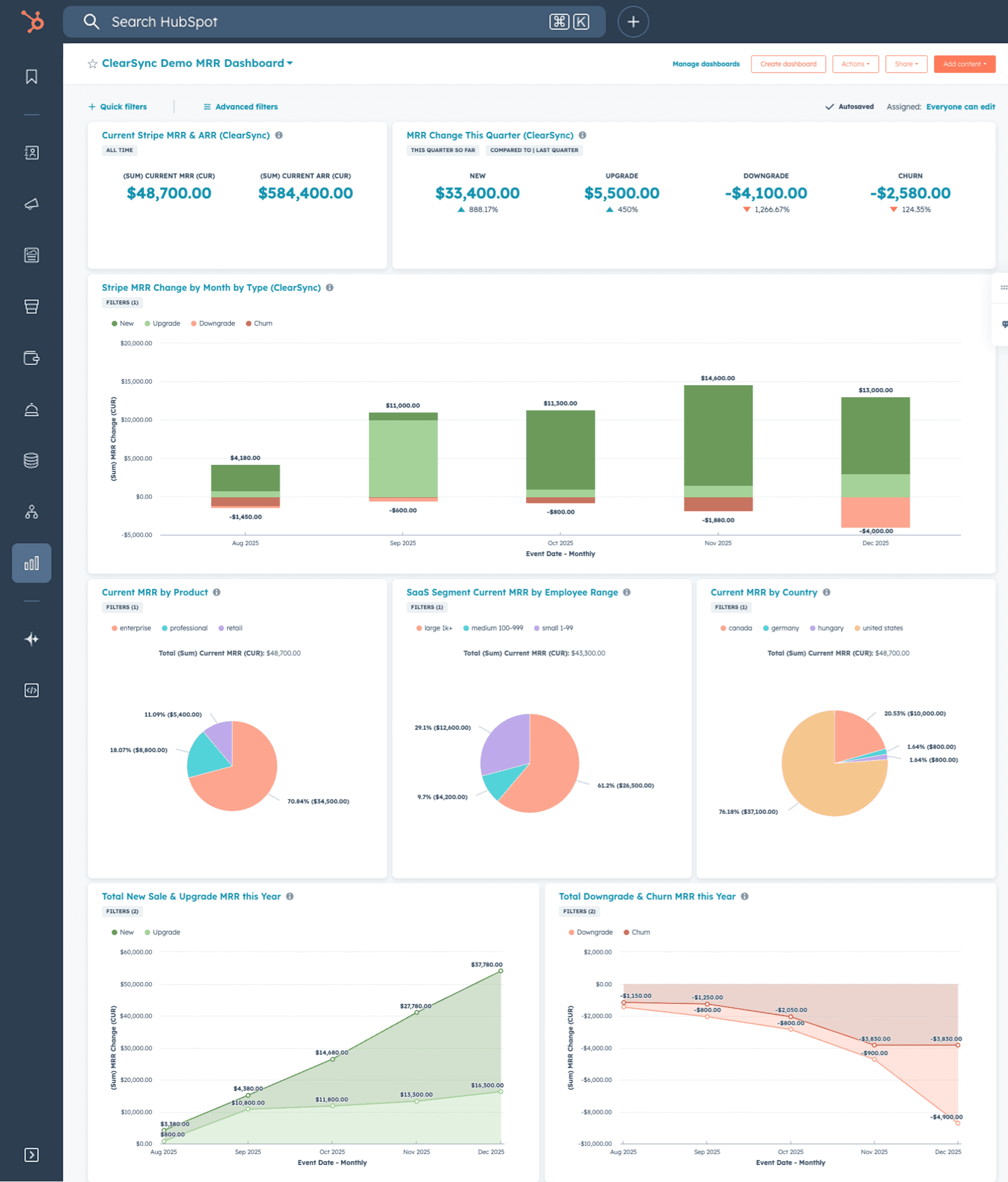
And because the events live in HubSpot, no SQL or data warehouse is required.
This is the same event reconstruction engine ClearSync uses to rebuild Stripe MRR history and track revenue changes over time.
When Teams Usually Realize They Need This
Most companies start looking for this when:
They can’t handle the volume of transactions from Stripe that need to be seen in HubSpot
They can see revenue totals, but no one understands why revenue changed for each customer
They want companies and contacts from Stripe to be created in HubSpot for them automatically
When questions start coming up like:
“Which customers churned last month?”
“Was that churn voluntary or payment failure?”
“Which customers downgraded before leaving?”
At that point teams usually realize they need subscription event tracking, not just a sync.
If You’re Running Stripe + HubSpot
You don’t need SQL queries or CSV exports to understand your subscription changes. What you actually need is event-level revenue data inside your CRM. Once those events exist, your teams can:
automate retention workflows
spot churn risk early
identify expansion opportunities
understand revenue changes instantly
That’s when Stripe revenue actually becomes operational, not just financial.
If you want to see what subscription events look like inside HubSpot, you can start a ClearSync trial and import your Stripe history in a few minutes.


